For seniors with visual impairments, a reliable talking clock can be a vital tool for staying independent and connected to time. The best models combine large, high-contrast displays with clear, loud voice output, making time-telling effortless. The Talking Clock for Visually Impaired, Elderly, and Blind with Large High-Contrast Display stands out as the top pick for its combination of readability and sound clarity, while the Hearkent Talking Clock offers bilingual support for diverse users. However, tradeoffs often involve balancing volume, simplicity, and additional features like alarms or temperature readouts. Keep reading for a detailed breakdown of these options to find the best fit for your needs.

Turn quiet afternoons into listening time
- Thousands of audiobooks, podcasts and originals
- Listen on your phone, tablet or Echo — also offline
- Cancel anytime
Complete the kit


Key Takeaways
- Top-ranking clocks excel in high-contrast displays paired with loud, clear audio output.
- Many models include multiple volume levels, but few balance high volume with audio clarity without distortion.
- Bilingual options like the Hearkent clock are valuable for multilingual seniors but tend to be more complex.
- Extra features such as temperature readouts or countdown timers are available but often come at the expense of simplicity.
- Choosing the right clock depends heavily on the user’s specific needs for ease, additional functions, and visual clarity.
| Talking Clock for Visually Impaired, Elderly, and Blind with Large High-Contrast Display |  | Best Overall for Simplicity and Accessibility | Display: Large, high contrast | Voice: North American accent male | Batteries: Requires three AAA batteries (not included) | VIEW ON AMAZON | See Our Full Breakdown |
| Hearkent Talking Clock for Elderly, English & Spanish, Orange |  | Best for Bilingual Users and Reminder Flexibility | Voice announcement: Yes | Languages: English and Spanish | Alarm settings: 3 independent alarms | VIEW ON AMAZON | See Our Full Breakdown |
| Talking Large Button Alarm Clock – Telling Time and Date for Elderly, Impaired Sight or Blind |  | Best for Visual Simplicity and Basic Functionality | Display: Large, high contrast buttons | Voice: Male English (North American accent) | Batteries: Requires two AAA batteries (not included) | VIEW ON AMAZON | See Our Full Breakdown |
| Talking Clock – Extra Loud Time & Date for Elderly, Dementia, Low Vision |  | Best for Hearing-Impaired Seniors with Hearing Aids | Display Type: Digital | Additional Features: Adjustable Brightness, Adjustable Volume, Loud Alarm | Power Source: Corded Electric, 3 AA batteries (not included) | VIEW ON AMAZON | See Our Full Breakdown |
| Talking Button Clock for the Blind, Elderly or Visually Impaired, Blue and White |  | Best for Simplicity and High Contrast Design | Design: High contrast button | Voice: North American male | Power: Requires two AAA batteries (not included) | VIEW ON AMAZON | See Our Full Breakdown |
| GOLOZA 7” Digital Dementia Clock, Talking Clock with 10 Volumes |  | Best Overall for Versatile Indoor Use | Display Type: LCD | Screen Size: 7 inches | Power Source: Corded Electric | VIEW ON AMAZON | See Our Full Breakdown |
| BATVOX Large Talking Button Clock with Alarm and Volume Control |  | Best for Simple, Loud Announcements | Color: Silver & Blue | Power: 3 AAA batteries (included) | Voice: Male English | VIEW ON AMAZON | See Our Full Breakdown |
| ORKA Talking Clock with Customizable Alarms and Large Display for Seniors |  | Best for Multi-Language Support and Routine Management | Display Size: 5.69” x 9.63” x 2.68” | Digit Height: 1.93 inches | Languages: English-USA, English-UK, Spanish, German, French, Italian | VIEW ON AMAZON | See Our Full Breakdown |
| Talking Clock for Elderly – Time & Date for Hearing or Visually Impaired |  | Best for Basic, Clear Audio Alerts | Voice: Male with neutral American accent | Display: Contrasting red and white | Batteries: 2 AAA (not included) | VIEW ON AMAZON | See Our Full Breakdown |
| TimeVocalist Talking Clock with Large Button, Alarms & Voice Reminders |  | Best for Customizable Reminders and Multiple Alarms | Large Button: Yes | Bluetooth Connectivity: Yes | Voice Reminders: Yes | VIEW ON AMAZON | See Our Full Breakdown |
| Talking Alarm Clock and Countdown Timer with Vibration and Temperature for Visually Impaired Seniors | 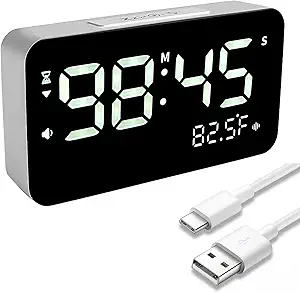 | Best for Versatile Alert Options and Indoor Use | Display Type: Digital | Display Size: 6 inches | Power Source: Battery Powered | VIEW ON AMAZON | See Our Full Breakdown |
More Details on Our Top Picks
Talking Clock for Visually Impaired, Elderly, and Blind with Large High-Contrast Display
This model stands out for its large, high-contrast display paired with a clear male voice, making it an excellent choice for users with severe vision impairments or dementia. Compared with the Hearkent Talking Clock, it offers a more straightforward interface with fewer functions, reducing potential confusion for seniors who prefer simplicity. The main tradeoff is its limited features—no multiple alarms or hourly chimes—making it less versatile but highly reliable for basic time-telling. Its simple one-button operation and loud announcements ensure that even those with very low vision can easily access the current time and date without frustration.
Pros:- Large, high-contrast display facilitates easy reading for low vision users
- Simple one-button operation reduces complexity
- Clear male voice announces time and date reliably
Cons:- Requires three AAA batteries which are not included, adding extra purchase steps
- Limited to basic time, date, and alarm functions
Best for: Seniors with significant vision loss or dementia who need a straightforward, easy-to-use clock without extra bells and whistles
Not ideal for: Users seeking advanced features like multiple alarms or customization, as this model focuses on core functions only
- Display:Large, high contrast
- Voice:North American accent male
- Batteries:Requires three AAA batteries (not included)
- Functions:Tell time, announce date, easy-to-set alarm
Our verdict“This clock is ideal for those needing a straightforward, highly accessible device for basic time and date announcements.”
Hearkent Talking Clock for Elderly, English & Spanish, Orange
This clock excels at bilingual announcements and multiple alarms, making it well-suited for seniors who speak both English and Spanish or need frequent reminders. Unlike the Talking Large Button Alarm Clock, which emphasizes simplicity, the Hearkent offers up to three alarms and hourly chimes, catering to those with complex scheduling needs. The tap-to-announce feature provides quick access to the time without manual button navigation, but its sensitivity may vary depending on the surface, and it cannot be fully muted—potential issues for users with hearing or sensory sensitivities. Its size and bilingual setup make it a flexible choice for diverse households.
Pros:- Voice guidance and bilingual manual simplify setup
- Multiple alarms and hourly chimes support varied reminder needs
- Tap-to-announce feature offers quick time updates
Cons:- Cannot be fully muted, which may disturb others
- Batteries (not included) need to be replaced regularly
- Tap sensitivity can vary, affecting ease of use
Best for: Seniors who prefer bilingual support, multiple alarms, and quick time access via tap
Not ideal for: Those seeking a minimalistic clock focused solely on basic time announcements, as it offers many additional features
- Voice announcement:Yes
- Languages:English and Spanish
- Alarm settings:3 independent alarms
- Hourly chime:Yes
- Vibration sensitivity:High
- Size:4.7 inches diameter × 2 inches height
Our verdict“This clock makes the most sense for bilingual seniors or those with complex reminder requirements who value flexibility.”
Talking Large Button Alarm Clock – Telling Time and Date for Elderly, Impaired Sight or Blind
This clock features oversized, high-contrast buttons and clear audio announcements, making it an excellent choice for users with low vision or cognitive impairments. Compared to the Talking Button Clock for the Blind, it offers a more comprehensive set of functions, including a calendar, which can benefit users who need a combined time and date device. Its main disadvantage is the lack of a visual digital readout, relying solely on audio cues, which might be limiting for those who prefer visual confirmation. The voice, while clear, is not customizable, but setup is straightforward with audible instructions and large controls.
Pros:- Large, high-contrast buttons facilitate easy operation
- Audible time, date, and calendar announcements assist visually impaired users
- Simple setup with audio instructions
Cons:- Requires two AAA batteries which are not included
- No visual digital display, limiting visual confirmation
- Voice is not customizable
Best for: Elderly users with low vision or dementia who need a simple, audible interface with additional calendar features
Not ideal for: Those who prefer visual digital displays or customizable voices, as this model relies on auditory cues only
- Display:Large, high contrast buttons
- Voice:Male English (North American accent)
- Batteries:Requires two AAA batteries (not included)
- Functions:Time, date, alarm, calendar
Our verdict“Ideal for users who need a straightforward, audible clock with calendar functions but do not require visual readouts.”
Talking Clock – Extra Loud Time & Date for Elderly, Dementia, Low Vision
This model emphasizes loudness and visibility, with an 85 dB volume and a large digital display, making it particularly suitable for users with hearing impairments. Its adjustable volume and brightness settings offer customization, but it falls short of the Hearkent Talking Clock in terms of multi-language support or multiple alarms. The clock is limited to indoor use and requires batteries, which could be an inconvenience. Its sizeable dimensions and loud alarm make it a strong choice for those who need maximum audio and visual clarity, but it may be overkill for users with normal hearing or less severe impairments.
Pros:- Very loud volume (85 dB) suitable for hearing-impaired users
- Large digital display enhances readability
- Adjustable volume and brightness allow customization
Cons:- Batteries not included, requiring additional purchase
- Limited to indoor use, not portable for outdoor or travel use
- No multi-language or additional features beyond basic time and date
Best for: Seniors with significant hearing loss or those who require a very loud, easy-to-read clock for indoor use
Not ideal for: Users seeking a portable or multi-functional clock with Bluetooth or smart features, as this is a straightforward loud clock
- Display Type:Digital
- Additional Features:Adjustable Brightness, Adjustable Volume, Loud Alarm
- Power Source:Corded Electric, 3 AA batteries (not included)
- Size:6.7″W x 3.8″H
- Materials:Acrylonitrile Butadiene Styrene (ABS)
Our verdict“This clock is best suited for seniors who need maximum volume and a large display for indoor environments with severe hearing impairments.”
Talking Button Clock for the Blind, Elderly or Visually Impaired, Blue and White
This clock combines high contrast visual design with simple operation, making it suitable for users with low vision or dementia. The high contrast button and clear male voice provide easy access to time and date, similar to the Talking Clock for Visually Impaired, but with a more visually distinct interface. Its main limitation is the absence of a backlit display or visual digital readout, which could be a drawback for those who prefer visual confirmation. The device’s straightforward button and audio setup make it accessible for users who need minimal complexity but might not suit those wanting more advanced features or multi-language options.
Pros:- High contrast button design enhances visual accessibility
- Clear male voice announces time and date effectively
- Adjustable volume supports different hearing needs
Cons:- Batteries not included, requiring additional purchase
- No backlit or visual digital display
- Limited to North American English voice only
Best for: Elderly or visually impaired users who prioritize high contrast and simple, audible time announcements
Not ideal for: Those looking for visual digital displays or customizable voices, as this relies solely on audio cues and high contrast buttons
- Design:High contrast button
- Voice:North American male
- Power:Requires two AAA batteries (not included)
- Features:Time and date announcement, alarm with audio instructions, adjustable volume
Our verdict“This clock suits users who need a high contrast, easy-to-press interface with reliable audio announcements but minimal visual features.”
GOLOZA 7” Digital Dementia Clock, Talking Clock with 10 Volumes
The GOLOZA 7-inch digital dementia clock stands out for its combination of voice announcements, customizable alarms, and visual themes, making it a strong choice for seniors who need both time and routine reminders. Unlike the simpler BATVOX Large Talking Button Clock, GOLOZA offers a larger display and more flexible features, though it requires a power outlet and USB connection, which may limit placement options. Its auto-dimming and multiple themes help reduce visual strain, but the complexity of features could overwhelm users unfamiliar with digital devices. This model is better suited for those who want a comprehensive, adaptable device for indoor use, especially in environments where constant power is available.Pros:- Voice announcements and reminders keep users informed and engaged
- Customizable alarms, brightness, and themes enhance comfort and usability
- Reliable corded power with battery backup ensures continuous operation
Cons:- Requires a power outlet and USB connection, limiting flexibility
- Limited to indoor use only and some may find feature set overwhelming
Best for: Seniors with moderate to advanced cognitive needs who value customizable routines and aesthetic options.
Not ideal for: Elderly users with very limited tech experience or those needing a portable, battery-powered device for outdoor use.
- Display Type:LCD
- Screen Size:7 inches
- Power Source:Corded Electric
- Additional Features:Adjustable Brightness, Adjustable Volume, Calendar Display, Talking clock
- Mounting Type:Plug-In
- Operation Mode:Electrical
- Connectivity Technology:USB
- Batteries Required:1 CR2032
- Item Dimensions:7.7″ W x 5″ H
Our verdict“This clock is ideal for seniors seeking a feature-rich, reliable indoor device with customizable options.”
BATVOX Large Talking Button Clock with Alarm and Volume Control
The BATVOX Large Talking Button Clock prioritizes ease of use with its oversized button and clear male voice, making it a top choice for seniors who need straightforward time and date alerts. Compared to the ORKA Talking Clock, BATVOX offers a more straightforward setup and physical button, but it lacks multiple alarms and advanced features like customizable voice options or multi-language support. Its loud, easy-to-understand announcements serve users with hearing impairments, though it relies on AAA batteries, which aren’t rechargeable. This device works well for those who need a basic, reliable talking clock without complexity.Pros:- Loud and clear voice announcements are easy to hear
- Large, high-contrast button simplifies operation
- Memory function retains time after battery replacement
Cons:- Requires 3 AAA batteries which are not rechargeable
- Limited to basic functions without multiple alarms or customization
Best for: Elderly users who want a simple, no-fuss device with loud, clear voice prompts.
Not ideal for: Users needing multiple alarms or advanced routines, as its features are limited.
- Color:Silver & Blue
- Power:3 AAA batteries (included)
- Voice:Male English
- Volume Control:Yes
- Memory Function:Yes
- Size:Large button
Our verdict“This clock is perfect for seniors seeking a straightforward, loud, and easy-to-use talking clock.”
ORKA Talking Clock with Customizable Alarms and Large Display for Seniors
The ORKA Talking Clock excels for its large HD display and support for multiple languages, making it highly adaptable for diverse users and those managing medication routines. Its extra-large digits are easier to read than smaller displays like the TimeVocalist, and its customizable alarms and mute switch suit users with specific needs. However, its AC power requirement and potential setup complexity could be barriers for some seniors unfamiliar with technology. Compared with TimeVocalist, ORKA offers more alarms and language options, but less portability due to the need for electrical power.Pros:- Large, easy-to-read display with extra-large digits
- Supports multiple languages and up to 8 alarms
- USB port, mute switch, and flashing alarms enhance usability
Cons:- Requires AC power, limiting placement flexibility
- Setup may be complex for some users
Best for: Seniors who need multilingual support and multiple alarms for medication or daily routines.
Not ideal for: Users who prefer battery-operated devices or have minimal setup experience.
- Display Size:5.69” x 9.63” x 2.68”
- Digit Height:1.93 inches
- Languages:English-USA, English-UK, Spanish, German, French, Italian
- Power Source:AC with battery backup
- Volume:Up to 90 decibels
- Alarm Count:Up to 8
Our verdict“This clock suits seniors who need multilingual alarms and a large display for routine management but are comfortable with electrical setup.”
Talking Clock for Elderly – Time & Date for Hearing or Visually Impaired
This simple clock provides clear audio announcements of time, date, and year, making it suitable for users who need straightforward, multi-function alerts. Its high-contrast red and white design enhances visibility compared to more visually complex devices like the GOLOZA clock, but it offers fewer features and no visual time display. The reliance on AAA batteries and limited functions make it best for those who value simplicity over customization. Compared with the BATVOX, it adds date and year announcements but sacrifices some ease of use with less audible feedback.Pros:- Easy to hear and understand with clear prompts
- High-contrast design improves visibility
- Multi-functionality as clock and alarm
Cons:- Requires 2 AAA batteries which are not rechargeable
- Limited to audio prompts only, no visual time display
Best for: Elderly individuals needing a no-frills, easy-to-hear clock with basic functions.
Not ideal for: Those seeking alarms for specific routines or multi-language options.
- Voice:Male with neutral American accent
- Display:Contrasting red and white
- Batteries:2 AAA (not included)
- Functions:Time, date, alarm
Our verdict“This clock is ideal for seniors who want simple, loud audio alerts without extra complexity.”
TimeVocalist Talking Clock with Large Button, Alarms & Voice Reminders
The TimeVocalist stands out for its large button and versatile voice reminders, making it ideal for users managing medication schedules or daily tasks. Its support for multiple alarms and multilingual voices offers flexible routines, surpassing basic models like BATVOX. However, its reliance on Bluetooth setup could be daunting for seniors with limited tech experience, and the lack of detailed display size information may leave some uncertain about visibility. In comparison to the ORKA clock, it offers simpler operation and no need for AC power, but it might require more initial configuration to maximize its features.Pros:- Large, accessible button for quick time and date access
- Customizable voice reminders for medications and routines
- Supports multiple alarms and power backup for settings
Cons:- Requires Bluetooth app setup, which could be complex
- Limited info on display size or visual features
Best for: Seniors or caregivers needing customizable reminders and flexible alarm scheduling.
Not ideal for: Users uncomfortable with Bluetooth setup or seeking a device with a large, built-in display.
- Large Button:Yes
- Bluetooth Connectivity:Yes
- Voice Reminders:Yes
- Alarms:Multiple, customizable
- Power Backup:Yes
- Voice Options:Multilingual male or female
- Display Format:12- or 24-hour
Our verdict“This clock is best for users needing flexible, customizable reminders and alarms with simple button access, despite setup complexity.”
Talking Alarm Clock and Countdown Timer with Vibration and Temperature for Visually Impaired Seniors
This rechargeable digital clock stands out for its comprehensive alert system, combining voice broadcasting with vibration, sound, and a night light, making it highly adaptable for various indoor environments. Unlike the larger, high-contrast models, this device offers a 99-minute countdown timer and indoor temperature monitoring, which are valuable for keeping track of time-sensitive activities and comfort. Its adjustable LED brightness helps users customize visibility, but the setup process can be complex, especially for seniors unfamiliar with modern electronics. The five-hour charging time adds inconvenience, especially if the device is used frequently. Compared to simpler models like the Talking Large Button Alarm Clock, this clock provides more features but demands more user familiarity with technology. It is best suited for seniors who want a multi-sensory clock for multiple rooms but are comfortable with some initial setup challenges.
Pros:- Voice broadcast helps visually impaired users easily check the time
- Multiple alert options improve accessibility and usability
- Indoor temperature monitoring and adjustable brightness enhance comfort
- Designed for versatile indoor use in bedrooms, kitchens, or offices
Cons:- Requires 5 hours to fully charge, which may be inconvenient
- Setup process can be complicated for some elderly users
- Limited to indoor use only, restricting portability
Best for: Seniors who need multiple alert options and temperature monitoring for varied indoor scenarios
Not ideal for: Elderly users who prefer plug-and-play simplicity or have limited patience for complex setup
- Display Type:Digital
- Display Size:6 inches
- Power Source:Battery Powered
- Batteries Required:1 Lithium Ion battery (included)
- Material:Acrylonitrile Butadiene Styrene (ABS)
- Dimensions:6″ W x 1.5″ H
- Operation Mode:Electrical
- Connectivity Technology:USB-C
- Additional Features:Adjustable Brightness, Calendar Display, LED Display, Loud Alarm, Timer
Our verdict“This model is ideal for tech-savvy seniors seeking a multi-sensory clock with temperature features but who can handle a more involved setup process.”