
The best elderly home monitoring systems help families stay connected or respond to a call for help, but no single device covers every care need. My best overall pick is the JubileeTV Remote Care System for families who want TV-based video calls, reminders, and remote support in one setup. For hands-on alerting, the CallToU Caregiver Pager with 2 Call Buttons suits homes where a caregiver needs to hear a call from more than one room, while the SecuLife Medical Alert Pendant adds GPS and two-way calling for someone who may leave home. The main tradeoffs are simple alert buttons versus camera-based oversight, home-only coverage versus mobile support, and ease of use versus more setup and features. Read on for the full breakdown of all 15 options and guidance on matching a system to your household.

Turn quiet afternoons into listening time
- Thousands of audiobooks, podcasts and originals
- Listen on your phone, tablet or Echo — also offline
- Cancel anytime
Complete the kit


Key Takeaways
- JubileeTV is the broadest connection-focused pick: it combines TV-based calls, reminders, and remote control, while most other products focus on a single alert or monitoring task.
- Two-button pagers suit shared care routines: CallToU and SYNLETT kits can place call buttons in separate locations, but they alert a nearby caregiver rather than provide GPS or off-site response.
- Camera monitors offer context, not automatic coverage: camera, audio, and pan-tilt-zoom options let caregivers check in remotely, but they depend on a caregiver watching or responding.
- Location changes the right choice: SecuLife’s GPS-enabled pendant is better suited to someone who goes outdoors than floor mats, bed alarms, or home intercoms.
- Specialized sensors address specific risks: the Smart Caregiver floor mat and Lunderg bed alarm focus on movement around a bed or room, so they are less flexible than general call buttons.
| JubileeTV Remote Care System for Seniors |  | Best for TV-Based Check-Ins | Connectivity: Bluetooth, infrared, and Wi-Fi | Compatible devices: Television, set-top box, DVD/Blu-ray player, and streaming device | Maximum supported devices: 4 | VIEW LATEST PRICE | See Our Full Breakdown |
| Wireless Caregiver Pager with 1 Call Button and 1 Receiver |  | Best for Long-Range, Expandable Alerts | Included components: 1 call button and 1 receiver | Wireless range: Up to 1,500 feet | Ringtones: 58 | VIEW LATEST PRICE | See Our Full Breakdown |
| CallToU Caregiver Pager with 2 Call Buttons |  | Best for Two Call Locations | Included components: 1 receiver and 2 call buttons | Open-area range: 500+ feet | Ringtones: 55 | VIEW LATEST PRICE | See Our Full Breakdown |
| SYNLETT Caregiver Pager with 2 Wireless Call Buttons |  | Best for a Portable Battery-Powered Receiver | Model: D091G1 | Included components: 1 portable pager and 2 wireless call buttons | Power source: Battery powered | VIEW LATEST PRICE | See Our Full Breakdown |
| Elderly Monitor with Camera, Two-Way Audio, and SOS Button |  | Best for No-Wi-Fi Video Monitoring | Display: 2.8-inch, 720P HD | Connection: 2.4GHz FHSS; no Wi-Fi required | Range: Up to 1,000 feet outdoors and 500 feet indoors | VIEW LATEST PRICE | See Our Full Breakdown |
| SecuLife Medical Alert Pendant for Seniors with Fall Detection, GPS Tracking, and Two-Way Calling |  | Best for Mobile Seniors | Connectivity: 4G LTE cellular | Alerts and location: Fall detection, SOS calling, GPS tracking, geofencing | Communication: Two-way cellular calling with hands-free auto-answer | VIEW LATEST PRICE | See Our Full Breakdown |
| Smart Caregiver Wireless Floor Mat Alarm and Pager System, 24 x 48 in | 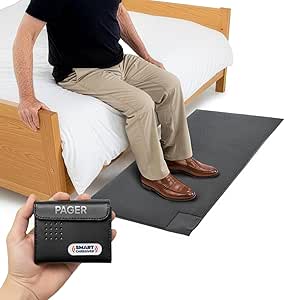 | Best for Bedside or Exit Alerts | Mat dimensions: 24 x 48 inches | Mat height: 0.5 inches | Maximum range: Up to 300 feet | VIEW LATEST PRICE | See Our Full Breakdown |
| Nomo Medical Alert System with Fall Detection for Seniors |  | Best for Connected Home Monitoring | Included components: Smart Hub, two Satellite range extenders, wearable Tags | Connectivity: Secure Wi-Fi; no landline required | Communication: Two-way voice through the Hub | VIEW LATEST PRICE | See Our Full Breakdown |
| CallToU Caregiver Pager – Wireless Alert Button & Home Intercom System | 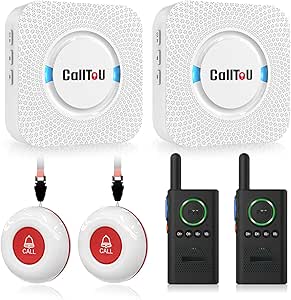 | Best for Two-Way Household Communication | Package contents: Two call buttons, two receivers, two walkie-talkies | Maximum range: Up to 500 feet in an open area; obstacles can reduce range | Communication: Two-way voice through walkie-talkies | VIEW LATEST PRICE | See Our Full Breakdown |
| Elderly Monitor with Camera and Audio, 2-Way Talk, SOS Button, Pan-Tilt-Zoom |  | Best No-Wi-Fi Video Monitor | Model: ABM200 | Screen: 2.8-inch portable receiver screen | Connectivity: 2.4GHz FHSS; no Wi-Fi | VIEW LATEST PRICE | See Our Full Breakdown |
| Smart Caregiver Video Monitor with Call Button |  | Best for Wi-Fi-Free Visual Check-Ins | Screen size: 2.8 inches | Video resolution: 720p | Night vision: Infrared | VIEW LATEST PRICE | See Our Full Breakdown |
| Wi-Fi Caregiver Pager System with Waterproof Call Button, Watch Button, and Receiver |  | Best for Shared App Alerts | Connectivity: 2.4 GHz Wi-Fi only | Included components: 1 waterproof call button, 1 watch button, 1 receiver | Maximum stated range: 656 feet (200 meters) | VIEW LATEST PRICE | See Our Full Breakdown |
| Lunderg Wireless Early Alert Bed Alarm System for Elderly |  | Best for Bed-Exit Alerts | Sensor pad size: 10 × 33 inches | Sensor pad lifespan: 15 months | Wireless range: Up to 400 feet | VIEW LATEST PRICE | See Our Full Breakdown |
| Daytech Caregiver Pager Call Button System |  | Best for Simple Press-to-Call Alerts | Maximum range: 100 ft (30 m) | Power source: Battery powered | Batteries: 4 included 12V alkaline batteries | VIEW LATEST PRICE | See Our Full Breakdown |
| CallToU Wireless Two-Way Intercom System for Home |  | Best for Long-Range Room-to-Room Audio | Number of units: 2 | Range: Up to 3,300 feet | Channels: 16 | VIEW LATEST PRICE | See Our Full Breakdown |
More Details on Our Top Picks
JubileeTV Remote Care System for Seniors
JubileeTV makes the television a connection point, pairing auto-answer video calls with caregiver controls, one-way check-ins, usage alerts, and reminders on the screen. That can suit someone who already uses a TV daily but may not manage a phone or tablet. Compared with the Elderly Monitor with Camera, JubileeTV uses the senior’s existing TV instead of a separate portable receiver, though it depends on a compatible TV setup and Wi-Fi. The large backlit voice remote is intended to simplify everyday control, while remote management gives caregivers a way to help from elsewhere. The tradeoff is that this is not just a local alert device: the supplied product information lists an ongoing subscription requirement, and setup needs an HDMI port plus a compatible connected device. Its voice remote’s stated range is 10 meters.
Pros:- Auto-answer video calls appear through the senior’s TV.
- Caregivers can remotely control TV functions and send reminders, photos, and videos.
- One-way check-ins and usage alerts add visibility beyond a basic call button.
- Large backlit voice remote is designed for easier use with existing TV equipment.
Cons:- Requires Wi-Fi, an HDMI port, and a compatible cable, satellite, or streaming device.
- A subscription is required for the service.
- The voice remote has a stated maximum range of 10 meters.
Best for: Families whose relative spends time watching TV and needs remote video check-ins, reminders, and help managing television controls.
Not ideal for: Households without reliable Wi-Fi, a compatible HDMI-connected TV setup, or willingness to pay for the required subscription.
- Connectivity:Bluetooth, infrared, and Wi-Fi
- Compatible devices:Television, set-top box, DVD/Blu-ray player, and streaming device
- Maximum supported devices:4
- Remote:Backlit, universal voice-control remote with finder
- Remote range:Up to 10 meters
- Setup:No programming required
- Power:2 AAA alkaline batteries required
Our verdict“Choose JubileeTV when TV-based connection and remote caregiver support matter more than a simple, subscription-free alert button.”
Wireless Caregiver Pager with 1 Call Button and 1 Receiver
This pager prioritizes a loud, far-reaching call signal over video or routine monitoring. Its stated wireless range of up to 1,500 feet in open conditions gives caregivers more flexibility to keep the receiver in another part of a property, while five volume levels and 58 ringtones allow the alert to be tailored to the household. The IP55-rated system is also suited to locations where dust or splashes may be a concern. Unlike JubileeTV, it does not provide check-ins, reminders, or remote TV control; it is a straightforward way for a person to request help. It also differs from the included-two-button CallToU pager by starting with one call button, though it can expand to as many as 30 buttons and multiple receivers. The tradeoffs are battery-powered components and a maximum volume that may be too loud for some homes.
Pros:- Stated open-area wireless range reaches up to 1,500 feet.
- Five volume levels and 58 ringtone choices allow alert customization.
- IP55-rated against water and dust.
- Expandable to up to 30 call buttons and multiple receivers.
Cons:- Includes only one call button, unlike the two-button CallToU and SYNLETT packages.
- Both button and receiver are battery powered.
- Maximum volume of 120 dB may be excessive for some users or households.
Best for: Caregivers covering a larger home or property who want a simple call-for-help system that can grow with added buttons and receivers.
Not ideal for: Families seeking video monitoring, scheduled reminders, or a ready-to-use setup with multiple call buttons included.
- Included components:1 call button and 1 receiver
- Wireless range:Up to 1,500 feet
- Ringtones:58
- Volume:5 levels; maximum 120 dB
- Water and dust resistance:IP55
- Power:Battery powered; lithium battery description
- Expansion:Up to 30 call buttons and multiple receivers
- Operating temperature:-4°F to 140°F
Our verdict“Pick this pager for a long-range, expandable call system, but choose JubileeTV or a camera monitor if visual check-ins are the priority.”
CallToU Caregiver Pager with 2 Call Buttons
CallToU is a practical fit when one person needs a way to call from two spots, such as a bedroom and bathroom. It comes with two buttons and one plug-in receiver, avoiding the need to buy a second button before covering those locations. The buttons can be worn on a neck strap or mounted, a useful choice for someone who may not keep a button in one place. Compared with the STECHRO pager, CallToU includes two call buttons in the box but has a shorter stated open-area range: 500+ feet rather than up to 1,500 feet. Its 55 tones and five volume levels provide alert choices, with a stated maximum of 110 dB. The main compromise is the receiver’s dependence on an outlet, and the advertised range is for open areas, not a guarantee through walls or across a home.
Pros:- Includes two call buttons with one receiver.
- Buttons can be worn with a neck strap or mounted.
- Offers 55 ringtone options and five volume levels.
- Buttons and receiver are described as waterproof and dustproof.
Cons:- Receiver must stay connected to an electrical outlet.
- The 500+ foot range is stated for open areas and may be shorter indoors.
- Maximum sound level of 110 dB may be insufficient for some users with significant hearing difficulty.
Best for: Families who want to place or wear two call buttons around the home and can keep the receiver plugged into an outlet.
Not ideal for: Caregivers who need a battery-powered portable receiver or need the longer stated open-area range of the STECHRO pager.
- Included components:1 receiver and 2 call buttons
- Open-area range:500+ feet
- Ringtones:55
- Volume:5 levels; maximum sound level 110 dB
- Button protection:Waterproof and dustproof
- Receiver power:Plug-in
- Call button batteries:2 included 12V alkaline batteries
- Item weight:7 ounces
Our verdict“Choose CallToU for two-button coverage and wearable or mounted call options when a plug-in receiver is acceptable.”
SYNLETT Caregiver Pager with 2 Wireless Call Buttons
SYNLETT separates itself with a portable, battery-powered pager, rather than the outlet-dependent receiver bundled with CallToU. That makes it more flexible for a caregiver moving around the home, while its two buttons can be worn on their included lanyards or wall-mounted. The system offers both a chime and a continuous alarm, letting a household choose a gentler notice or a more persistent alert. Its stated range is up to 500 feet in open areas, matching the general scale of CallToU’s 500+ foot claim but falling well short of the STECHRO pager’s stated 1,500 feet. The key tradeoff is power management: the pager needs four AA batteries, and a portable receiver can still run out of charge or require battery replacement. The product data does not list ringtone counts or adjustable volume levels.
Pros:- Portable pager and two wireless call buttons are included.
- Chime and continuous alarm modes offer different alert styles.
- Call buttons can be wall-mounted or worn with lanyards.
- Battery-powered receiver avoids dependence on a fixed outlet.
Cons:- Requires four AA batteries, adding battery replacement to upkeep.
- The 500-foot range applies to open areas and may be lower indoors.
- The supplied specs do not state ringtone options or adjustable volume levels.
Best for: Caregivers who want to carry the receiver between rooms and need two call buttons that can be worn or mounted.
Not ideal for: Households needing a very long stated range, detailed ringtone and volume choices, or a receiver that plugs in without battery upkeep.
- Model:D091G1
- Included components:1 portable pager and 2 wireless call buttons
- Power source:Battery powered
- Batteries:4 AA batteries required; included
- Maximum range:Up to 500 feet in open areas
- Audible noise level:90 dB
- Alert modes:Chime or continuous alarm
- Dimensions:3.24 × 1.3 × 2.53 inches
Our verdict“Choose SYNLETT over the plug-in CallToU when carrying the receiver matters more than a longer stated range or documented alert customization.”
Elderly Monitor with Camera, Two-Way Audio, and SOS Button
This monitor pairs live video with a direct SOS call button without relying on household Wi-Fi, making it a distinct choice for families who want a local connection rather than a network-based setup. A portable 2.8-inch receiver supports two-way audio, while the camera pans and tilts to cover more of a room than a fixed view. Night vision, reminders, temperature alerts, and white noise extend it beyond simple video calls. Compared with JubileeTV, it includes a dedicated receiver and works over a private 2.4GHz FHSS connection, but it does not offer the same TV-based remote control or stated usage alerts. The small screen is the clearest compromise: it is portable, but less suited to viewing detail than a television. Battery capacity is listed, while runtime is not, so caregivers cannot infer how often the receiver needs charging.
Pros:- Uses a private 2.4GHz FHSS connection and does not require Wi-Fi.
- Two-way audio and an SOS button support direct contact and help requests.
- Pan-and-tilt camera, infrared night vision, and 4x digital zoom expand room coverage.
- Includes reminders, white noise, and temperature alerts.
Cons:- The portable display is only 2.8 inches.
- Battery runtime is not specified despite the listed 2000mAh battery.
- Unlike JubileeTV, it does not use the senior’s TV for calls or remote TV control.
Best for: Families who want a standalone, no-Wi-Fi camera monitor with two-way talk and an SOS button for checking on a senior at home.
Not ideal for: Caregivers who want a large viewing screen, remote access over the internet, or a stated receiver battery runtime.
- Display:2.8-inch, 720P HD
- Connection:2.4GHz FHSS; no Wi-Fi required
- Range:Up to 1,000 feet outdoors and 500 feet indoors
- Camera rotation:355° horizontal and 90° vertical
- Digital zoom:4x
- Communication:Two-way audio
- Other features:Infrared night vision, SOS button, reminders, white noise, and temperature alerts
- Battery:2000mAh
Our verdict“Choose this monitor for local video and two-way communication without Wi-Fi, provided a small handheld screen suits the caregiver.”
SecuLife Medical Alert Pendant for Seniors with Fall Detection, GPS Tracking, and Two-Way Calling
Among these options, I’d choose the SecuLife pendant for someone who leaves home independently and needs help-requesting features beyond the house. Its GPS tracking and customizable geofences let caregivers receive location-related alerts, while fall detection, SOS calling, and two-way cellular communication offer several ways to connect during an emergency. Compared with the Nomo Medical Alert System, which centers on a Wi-Fi-connected home hub, SecuLife is better suited to outings because it uses 4G LTE. The tradeoff is an ongoing service subscription, and the listing gives battery life as both up to six days and an average of five, so charging schedules may take some planning. Its IP67 water resistance adds flexibility, but this remains a wearable that needs to be kept charged and worn.
Pros:- GPS tracking and customizable geofence alerts can help caregivers stay informed about location.
- Fall detection and an SOS function provide automatic and manual ways to request help.
- Two-way 4G LTE calling supports communication through the pendant.
- IP67 water resistance and listed battery life of up to six days support regular wear.
Cons:- Service requires a monthly subscription.
- The listing gives both up to six days and an average of five days of battery life, making runtime less certain.
- A wearable system depends on the user keeping the pendant charged and wearing it.
Best for: Seniors who go out alone and families who want GPS, geofence alerts, and cellular calling in a wearable pendant.
Not ideal for: People seeking a no-subscription system or a home-only alert setup that does not require wearing and charging a device.
- Connectivity:4G LTE cellular
- Alerts and location:Fall detection, SOS calling, GPS tracking, geofencing
- Communication:Two-way cellular calling with hands-free auto-answer
- Water resistance:IP67
- Battery capacity:1000 mAh
- Battery life:Up to 6 days; 5-day average also listed
- Service:Subscription required; listed at $20 per month
- Included items:Charging cable, SIM card, user manual
Our verdict“Choose SecuLife for a senior who spends time away from home and needs cellular contact and location features, provided the subscription and charging routine are acceptable.”
Smart Caregiver Wireless Floor Mat Alarm and Pager System, 24 x 48 in
I’d pick this floor mat and pager when the main concern is knowing that someone has stepped out of bed or approached an exit—not tracking them around the home. The 24 x 48-inch contact mat sends an alert to a caregiver pager, with audible or vibrate options and a stated range of up to 300 feet. That makes it more targeted than the CallToU system, which uses call buttons and walkie-talkies for user-initiated requests rather than detecting a step on a specific spot. The pager can also work with compatible sensors, giving a household room to expand its alert setup. Its limits are equally clear: the mat only reports contact where it is placed, and the pager needs two AA batteries that are not included. Additional sensors are sold separately.
Pros:- The large 24 x 48-inch mat can alert caregivers when someone steps on it.
- Pager alerts can be audible or vibrate, offering options for different caregiving settings.
- The stated wireless range is up to 300 feet.
- Pager compatibility with other Smart Caregiver sensors can support a broader alert setup.
Cons:- Coverage is limited to the area where the contact mat is placed.
- The pager requires two AA batteries, which are not included.
- Additional compatible sensors are sold separately.
Best for: Caregivers who need an alert when a senior steps onto a mat beside a bed or near an exit.
Not ideal for: Families seeking GPS, two-way voice, or coverage throughout the home without placing sensors at specific locations.
- Mat dimensions:24 x 48 inches
- Mat height:0.5 inches
- Maximum range:Up to 300 feet
- Alert options:Audible or vibrate
- Audible alert level:70 dB
- Sensor technology:Contact sensor
- Pager power:Two AA batteries, not included
- Included:Wireless floor mat and caregiver pager
Our verdict“Choose this system for focused bedside or exit monitoring, but choose a wearable like SecuLife if location and help requests away from the mat matter more.”
Nomo Medical Alert System with Fall Detection for Seniors
The Nomo system is a strong fit for families who want home-based fall alerts and voice contact without asking a senior to use a phone. Its kit combines a Smart Hub, two Satellite range extenders, and wearable Tags with fall detection and a panic button; caregivers can receive notifications, and two-way voice runs through the Hub. Compared with the Smart Caregiver floor mat, Nomo offers a broader wearable-alert approach rather than monitoring only one step-on location. Setup is described as plug-and-play, and the system uses Wi-Fi rather than a landline. That also defines its main limitation: it depends on a working Wi-Fi connection and does not provide the cellular mobility of the SecuLife pendant. The 30-day 24/7 monitoring trial is temporary; continued monitoring requires a subscription.
Pros:- Wearable Tags provide fall detection and a panic button.
- Two-way voice through the Smart Hub lets caregivers communicate through the home system.
- Two Satellite range extenders are included in the kit.
- Plug-and-play setup does not require a landline or technician visit.
Cons:- Wi-Fi is required for the system to operate.
- 24/7 emergency monitoring requires a subscription after the 30-day trial.
- Unlike the SecuLife pendant, the described system is designed for home use rather than cellular monitoring on outings.
Best for: Households with reliable Wi-Fi that want wearable fall detection, a panic button, and hub-based voice communication at home.
Not ideal for: Seniors who need monitoring away from home, households without dependable Wi-Fi, or buyers unwilling to continue a subscription after the trial.
- Included components:Smart Hub, two Satellite range extenders, wearable Tags
- Connectivity:Secure Wi-Fi; no landline required
- Communication:Two-way voice through the Hub
- Alerts:Fall detection, panic button, caregiver notifications
- Monitoring:30-day 24/7 monitoring trial; subscription required afterward
- Emergency services:RapidSOS
- Setup:Plug-and-play
Our verdict“Choose Nomo for a Wi-Fi-connected home that needs wearable fall alerts and hub voice communication, not for independent monitoring outside the house.”
CallToU Caregiver Pager – Wireless Alert Button & Home Intercom System
For a household that wants a senior to request help and then speak with a caregiver, I’d favor this CallToU package over the Smart Caregiver floor mat. It includes two call buttons, two receivers, and two walkie-talkies, combining one-press alerts with two-way voice rather than relying on a sensor to detect movement. The listed outdoor range reaches 500 feet in open space, though the product notes that indoor obstacles can reduce useful range and recommends keeping it under 300 feet. Waterproof and dustproof components give the buttons more placement flexibility, while adjustable volume and selectable ringtones help tailor alerts. Compared with Nomo, CallToU does not offer the described fall detection or monitored emergency service; its strength is direct household communication. The receiver also needs an outlet, and its intercom system cannot pair with the pager system.
Pros:- Package includes two call buttons, two receivers, and two walkie-talkies.
- Two-way voice communication lets caregivers respond verbally after an alert.
- Listed range reaches 500 feet in an open area.
- Waterproof and dustproof components, adjustable volume, and 55 ringtone choices support flexible placement and alert preferences.
Cons:- Indoor walls and other obstacles can reduce range; the product recommends under 300 feet indoors.
- A receiver must be plugged into an outlet, limiting where it can be used.
- The wireless intercom system cannot be paired with the pager system.
Best for: Families who want a senior to press a call button and speak with nearby caregivers using included receivers and walkie-talkies.
Not ideal for: Buyers seeking automatic fall detection, professional emergency monitoring, or a fully portable receiver that does not need an outlet.
- Package contents:Two call buttons, two receivers, two walkie-talkies
- Maximum range:Up to 500 feet in an open area; obstacles can reduce range
- Communication:Two-way voice through walkie-talkies
- Alert choices:55 selectable ringtones and adjustable volume
- Maximum audible level:110 dB
- Component protection:Waterproof and dustproof components
- Power:Battery powered; alkaline and lithium polymer batteries included
- Mounting:Wall mount or door mount
Our verdict“Choose CallToU when direct call-button alerts and household voice communication matter more than automatic fall detection or monitored service.”
Elderly Monitor with Camera and Audio, 2-Way Talk, SOS Button, Pan-Tilt-Zoom
This monitor suits caregivers who want to check in visually without connecting a camera to home Wi-Fi. Its 2.8-inch receiver screen uses 2.4GHz FHSS, and the system includes two-way audio, infrared night vision, and a dedicated SOS button. Medication reminders and temperature alerts add household prompts that the CallToU pager does not provide, while the no-Wi-Fi design avoids relying on a smartphone app or internet connection. That privacy-oriented setup comes with a different kind of constraint: caregivers use the supplied screen rather than a phone, and the stated range is up to 1,000 feet, which may not cover larger properties. Unlike Nomo’s wearable fall-detection Tags, this is a camera-and-audio monitor, so its value depends on where the camera is placed and whether the senior can use the SOS button.
Pros:- 2.4GHz FHSS operation does not require Wi-Fi.
- Two-way audio and a dedicated SOS button support direct caregiver communication.
- Infrared night vision helps with monitoring in low light.
- Temperature alerts and medication reminders add household prompts beyond basic video and audio.
Cons:- Caregivers must use the included receiver screen rather than a smartphone app.
- The stated range is up to 1,000 feet and may not cover larger properties.
- The portable screen may need frequent charging for all-day use.
Best for: Caregivers who want a private, no-Wi-Fi video and audio link with a dedicated receiver, night vision, and reminders.
Not ideal for: Families who need wearable automatic fall detection, smartphone-based remote access, or coverage across a large property beyond the stated range.
- Model:ABM200
- Screen:2.8-inch portable receiver screen
- Connectivity:2.4GHz FHSS; no Wi-Fi
- Zoom:4x
- Range:Up to 1,000 feet
- Battery capacity:2000 mAh
- Communication and alerts:Two-way talk, VOX mode, SOS button
- Other features:Infrared night vision, temperature sensor, medication reminders
Our verdict“Choose this monitor for private, local video and audio check-ins without Wi-Fi, but look to Nomo for wearable fall alerts and monitored service.”
Smart Caregiver Video Monitor with Call Button
For families who want to see and speak with someone at home without setting up a network, this rechargeable monitor pairs a camera with a 2.8-inch screen and works without Wi-Fi or an app. Infrared night vision supports low-light viewing, while two-way audio allows a caregiver to check in or respond remotely. Its call button offers five assistance options, giving the person at home a way to signal for help.
Compared with the Wi-Fi Caregiver Pager System, this adds video but does not offer app notifications for family members. The tradeoff is that the call button works best near the camera, and automatic alerts for getting out of bed require separately sold products. I’d choose it for direct visual check-ins, not whole-home movement monitoring.
Pros:- Works wirelessly without Wi-Fi or an app
- Rechargeable camera and monitor reduce dependence on fixed power
- Infrared night vision and two-way audio support visual check-ins after dark
- Call button provides five assistance options
Cons:- Call button works best when kept close to the camera
- Automatic getting-up alerts require separately sold products
Best for: Families who want local video and two-way conversation without Wi-Fi, especially when the monitor and call button can stay near the person being monitored.
Not ideal for: Caregivers who need remote app notifications, a wide-area call button, or automatic alerts when someone gets out of bed.
- Screen size:2.8 inches
- Video resolution:720p
- Night vision:Infrared
- Audio:Two-way audio
- Connectivity:Wireless; no Wi-Fi required
- Charging:Rechargeable via USB-C
- Call button:Five assistance options
- Use:Indoor
Our verdict“Choose this for simple, network-free video check-ins, but pick the Wi-Fi Caregiver Pager System if shared app alerts matter more than seeing the person.”
Wi-Fi Caregiver Pager System with Waterproof Call Button, Watch Button, and Receiver
This system suits families who want call-button alerts to reach more than one caregiver: its buttons can trigger the receiver and send app notifications to family members. The waterproof call button offers more placement flexibility around everyday routines, while the watch button can stay with the person who needs help. A loud alarm, flashing light, four volume levels, and customizable ringtones give households ways to adapt alerts to their environment.
Compared with the Daytech Caregiver Pager Call Button System, this adds Wi-Fi app notifications and a waterproof button, but depends on a 2.4 GHz network. Its stated range is up to 656 feet, though layout and obstacles can affect real-world coverage. SMS and phone call alerts require a subscription, so I’d skip it if you need dependable alerts without internet or ongoing service costs.
Pros:- App notifications can be shared with family members
- Waterproof call button offers flexible placement
- Watch button provides a wearable way to request help
- Customizable ringtones and four volume levels help tailor alerts
Cons:- Only supports 2.4 GHz Wi-Fi
- SMS and phone call alerts require a subscription
- Stated range may be reduced by walls and home layout
Best for: Families with 2.4 GHz Wi-Fi who want app notifications shared among caregivers, plus a wearable button and a water-resistant call option.
Not ideal for: Households without 2.4 GHz Wi-Fi or caregivers who need SMS and phone call alerts without a subscription.
- Connectivity:2.4 GHz Wi-Fi only
- Included components:1 waterproof call button, 1 watch button, 1 receiver
- Maximum stated range:656 feet (200 meters)
- Volume levels:4
- Alarm:Flashing light and loud sound
- Mounting options:Screw mount, adhesive patch, or lanyard
- Package dimensions:4.13 x 4.13 x 3.11 inches
- Item weight:7.4 ounces
Our verdict“Pick this when several family members need app alerts and the home has 2.4 GHz Wi-Fi; choose Daytech for a simpler, network-free call-button setup.”
Lunderg Wireless Early Alert Bed Alarm System for Elderly
When the main concern is someone getting out of bed without assistance, this sensor-pad system is more targeted than a general call button. Its pad sits at hip level and is designed to alert a caregiver before the person gets up. The portable pager offers adjustable volume and vibration, and the system works without Wi-Fi or an app—useful when a bedroom needs local alerts rather than connected monitoring.
Compared with the Smart Caregiver Video Monitor with Call Button, Lunderg detects pressure changes instead of providing a visual check-in or two-way conversation. The pad is wipe-clean and incontinence-resistant, but it has a stated 15-month lifespan and needs replacement. Its range is up to 400 feet, though walls and the home layout can limit coverage. I’d favor it for bed-exit awareness, not general room-to-room communication.
Pros:- Designed to alert caregivers before the person gets out of bed
- Pager supports adjustable volume and vibration
- Works without Wi-Fi, an app, or tools for setup
- Wipe-clean, incontinence-resistant sensor pad
Cons:- Sensor pad has a stated 15-month lifespan and requires replacement
- Obstacles and home layout can reduce the stated wireless range
- Detects bed-pad pressure rather than providing video or two-way audio
Best for: Caregivers monitoring an older adult who may get out of bed without help and who need a local alert with no app or Wi-Fi setup.
Not ideal for: Families looking for video, two-way conversation, or an alert button the older adult can press on demand.
- Sensor pad size:10 × 33 inches
- Sensor pad lifespan:15 months
- Wireless range:Up to 400 feet
- Audible noise:120 dB
- Sensor technology:Lunderg Pre-Alert Smart Sensor Technology
- Power:Battery powered; 2 AA batteries included
- Pager alerts:Adjustable volume or vibration
- Included items:Bed sensor pad, pager, instructions, batteries, wall mount bracket, bed clips and bands
Our verdict“Choose Lunderg when bed-exit alerts are the priority; select the Smart Caregiver monitor instead when visual check-ins and conversation matter more.”
Daytech Caregiver Pager Call Button System
Daytech keeps the task straightforward: press a button, and the receiver alerts a caregiver. The system comes pre-paired, with a wall-mountable splash-proof call button, a watch pager, and a neck strap. Its 20 ringtone options let households choose a sound that is easier to recognize, while the stated 100-foot range fits smaller homes or nearby rooms.
Compared with the Wi-Fi Caregiver Pager System, Daytech avoids network setup and subscription-based phone or text alerts, but it does not offer shared app notifications or a waterproof button. The call button and watch should not be immersed in water, and the system is described as pairing one receiver with one call button individually. I’d pick it for a basic local alert, not for broad coverage or multi-caregiver remote monitoring.
Pros:- Simple press-to-call operation
- Pre-paired components are ready to use
- Wall-mountable call button is splash-proof
- Offers 20 ringtone options
Cons:- Call button and watch should not be immersed in water
- Stated range is limited to 100 feet
- One receiver connects to one call button individually
Best for: Households seeking a pre-paired, local call-button system for a smaller home, with a wall-mounted button and wearable watch pager.
Not ideal for: Caregivers who need app notifications, a waterproof wearable or call button, or coverage beyond the stated 100 feet.
- Maximum range:100 ft (30 m)
- Power source:Battery powered
- Batteries:4 included 12V alkaline batteries
- Sound level:55 dB
- Mounting type:Wall mount
- Call button water resistance:Splash-proof; not for immersion
- Ringtones:20
- Included accessories:Neck strap
Our verdict“Choose Daytech for a basic, network-free alert in a smaller home; select the Wi-Fi Caregiver Pager System for shared app notifications and a waterproof call button.”
CallToU Wireless Two-Way Intercom System for Home
This two-unit intercom is for households that need to talk across rooms or nearby outdoor areas, rather than simply receive a press-to-call alert. It uses UHF connectivity and works without Wi-Fi, cellular service, an app, or a subscription. VOX hands-free operation and audio monitoring can support check-ins when the person at home may not be able to reach a button, while a keypad lock helps prevent unintended changes.
Compared with the Daytech Caregiver Pager Call Button System, CallToU emphasizes two-way conversation and a much longer stated range—up to 3,300 feet—rather than a simple alert from a wearable or wall button. The tradeoff is that it is audio-only, and its battery claim is up to 36 hours on standby, not continuous talk time. I’d choose it for communication across a larger property, not visual monitoring or emergency response on its own.
Pros:- Works without Wi-Fi, cellular service, an app, or a subscription
- Long stated range supports communication across larger spaces
- VOX hands-free mode and audio monitoring support remote check-ins
- Rechargeable Type-C batteries and keypad lock are included
Cons:- Audio-only system provides no video
- Up to 36 hours refers to standby time, not continuous use
- Two-way intercom communication is not a substitute for a dedicated emergency alert service
Best for: Families who need network-free, two-way audio between rooms or across a larger home and can keep the units charged.
Not ideal for: Caregivers who need video, a dedicated emergency call button, or a device with a stated continuous-use battery duration.
- Number of units:2
- Range:Up to 3,300 feet
- Channels:16
- Battery capacity:1,000 mAh
- Battery life:Up to 36 hours standby
- Charging:Type-C
- Connectivity:UHF
- Features:VOX hands-free, audio monitoring, keypad lock
- Warranty:1 year
Our verdict“Choose CallToU for network-free two-way audio across a larger home; choose Daytech if a simple press-to-alert button is the main need.”
How We Picked
I compared these 15 systems by the care task they address, who receives an alert, and how much setup or routine upkeep a household is likely to handle. I gave more weight to products with a clear use case, accessible controls, and a practical path from a resident’s need to a caregiver’s response. I also distinguished local alert systems from camera-based check-ins and mobile medical-alert features; those serve different situations and should not be ranked as if they were interchangeable.
The order favors breadth and everyday usefulness for the first recommendation, then separates options by specific needs such as room-to-room calling, visual check-ins, bed or floor movement alerts, and support outside the home. A narrow sensor can be the better choice for a household with a defined risk, even if it sits lower in an all-purpose ranking. I also weighed meaningful limits, including dependence on a nearby caregiver, need for connectivity, and the risk of treating monitoring as a substitute for direct care.
Factors to Consider When Choosing Best Elderly Home Monitoring Systems
Before choosing a device, I would start with the care gap the household needs to fill. A call button, camera, movement alarm, and GPS pendant do different jobs, and buying more features does not automatically make care safer. These factors can help narrow the options without confusing monitoring with emergency response.
Match the alert to the risk
Start with a specific situation: difficulty reaching a caregiver, wandering beyond the home, getting out of bed unassisted, or needing a visual check-in. A wearable alert can travel with the person, while a floor mat or bed sensor only addresses movement near its placement. Families sometimes buy a camera when the real issue is that nobody hears a call for help; a camera cannot prompt a response if no one is watching. Conversely, a call button may not help if the resident cannot reliably press it. Pick the smallest system that addresses the known risk, then add coverage only where care routines show a gap.
Check who receives the alert and what happens next
An alert is useful only if someone can hear it, understand it, and act. Before buying, identify the receiver, its likely location, and who covers during sleep, errands, or caregiver handoffs. A home pager or intercom typically depends on someone nearby, whereas a mobile medical-alert device may support contact beyond the home depending on its service and connectivity. Do not assume that an SOS button automatically summons emergency services; check the product’s alert path and any required plan. A simple written response routine can matter as much as the hardware.
Plan for layout, range, and connectivity
Walls, floors, room arrangement, and distance between a button and receiver affect whether a local alert system fits a home. Place a receiver where a caregiver will actually notice it, and check the manufacturer’s stated range against the home’s layout rather than treating an open-area figure as a guarantee. Wi-Fi camera systems also rely on a stable network and suitable placement, while cellular wearables depend on coverage in the places the wearer goes. If the person spends time in a basement, garden, or outbuilding, test coverage there before relying on alerts. A system that works only in one convenient room may leave the most important area uncovered.
Choose controls the older adult will use
Small buttons, confusing menus, charging routines, and unfamiliar screens can make a capable system impractical. Consider dexterity, hearing, vision, memory, and comfort with phones or television controls, then favor a control the person can use without coaching every time. A pendant can be available while moving, but only if it is comfortable enough to wear consistently. A camera may make remote family contact easier for someone who already uses a TV, though it can feel intrusive to another person. Ask the older adult to take part in the choice and agree on where cameras or sensors may be used.
Separate monitoring from emergency response
Home cameras, two-way intercoms, and caregiver pagers can support communication, but they do not replace a staffed monitoring service or a caregiver who can physically help. Read what happens after a button press, including whether an alert goes only to a household receiver, a phone, or a response center. Check whether fall detection is included, how it works, and whether it can miss an event or trigger a false alert. Keep a backup plan for power or network interruptions if the household relies on connected features. The right system should fit into a broader care plan rather than carry the whole burden.
Account for upkeep and changing needs
Everyday maintenance can include charging a wearable, replacing batteries, cleaning a call button, checking a sensor’s position, or updating an app. Decide who owns those tasks and how often they can realistically do them. A low-maintenance local pager may suit a stable home routine, while a camera or connected system can require more network and device support. Needs may change after a fall, a move, or a shift in caregiver availability, so choose a setup that can be adjusted without rebuilding the entire routine. Revisit the arrangement periodically to confirm that alerts still reach the right person.
Frequently Asked Questions
Can a home monitoring system replace a medical alert service?
Usually not. A caregiver pager, camera, or intercom generally connects the older adult with someone in or near the home, while a medical alert service may route calls to a response center under its own service terms. Check exactly who receives an alert and whether professional monitoring is included or requires a separate subscription. If the person is often alone, compare response coverage and backup arrangements rather than relying on a camera or local receiver. These systems can complement each other, but they are not automatically interchangeable.
Should I choose a camera monitor or a call button?
Choose a call button when the resident can press it and needs a direct way to summon a nearby caregiver. A camera is more useful when family members need visual check-ins or two-way conversation from another location, but it requires someone to look at or respond to the feed. Some households may benefit from both, yet adding a camera does not solve a missed alert if no one is monitoring it. Privacy preferences and the person’s willingness to use the device should guide the choice as much as technical features. Agree on camera placement and access before setting it up.
What should I buy if the main concern is leaving bed or walking at night?
A bed alarm or floor mat is designed around movement near a particular area, making it a focused choice for a nighttime routine. Think through where the alert receiver will be and whether the caregiver can respond quickly from that location. These sensors do not provide the same flexibility as a wearable call button and may not help once the person has moved away from the monitored spot. Placement and consistent use matter, so review the setup with the person who will respond. If the risk extends beyond the bed area, pair the sensor with a broader alert plan rather than expecting one mat to cover the whole home.
Do I need Wi-Fi or a subscription for these systems?
Requirements vary by product and feature. Local wireless pagers may work with a paired receiver, while Wi-Fi cameras need a suitable network for connected viewing and a GPS medical alert may rely on cellular service or an associated plan. Read the current product specifications for connectivity, app access, recurring fees, and what functions stop if service lapses. Also check coverage in the rooms or outdoor areas where the older adult spends time. A device that works without a subscription can still have range or power limits that matter to the household.
How can I tell whether the older adult will actually use the system?
Involve the person in choosing the device and let them handle the controls before relying on it. Favor a familiar interaction, such as a large call button or a TV-based interface, if phone apps and small screens are frustrating. Check whether the device must be worn, charged, positioned, or remembered at specific times, since routines often determine real-world use. Explain who receives an alert and what that person will do, so the system does not create uncertainty. Recheck comfort and habits after setup; a device left unused cannot provide meaningful monitoring.
Conclusion
For broad, TV-centered communication and remote support, I would choose JubileeTV as the best overall. The Wireless Caregiver Pager with 1 Call Button and 1 Receiver is the straightforward best value for a household that needs a basic local call system, while JubileeTV is the best premium-style option for families who want more than a simple alert. For beginners, I would start with a basic CallToU or Daytech pager if the need is clear and the caregiver is nearby; fewer steps can make everyday use easier. Choose SecuLife for mobile support and GPS, Lunderg or Smart Caregiver for bed or floor movement alerts, and a camera monitor when visual check-ins are the priority. My final recommendation is to pick for the specific care gap, then confirm that the alert reaches a person who can respond.
Halloween Picks

Gemmy 6-Foot Leatherface Animatronic Halloween Decoration

HOPOCO Halloween Pumpkin Fog Machine with 12 LED Colors and 4 Light Modes

15-Foot Halloween Pumpkin Inflatable with LED Lights and Air Blower
As an affiliate, we earn on qualifying purchases.