
Choosing the right nanny cam for elderly parents requires balancing constant oversight with respect for dignity. My top recommendation is the Eufy Security 4K Indoor Cam S350 because it offers local storage, eliminating privacy concerns and monthly fees. For families needing direct communication, the CIAJIE Indoor Two-Way Video Call Security Camera stands out with its built-in screen for easy interaction. The main tradeoff in this category is between advanced AI features and simplicity; complex setups can frustrate caregivers and seniors alike. Read on to see which model fits your specific care needs and budget.

Turn quiet afternoons into listening time
- Thousands of audiobooks, podcasts and originals
- Listen on your phone, tablet or Echo — also offline
- Cancel anytime
Complete the kit


Key Takeaways
- Local storage options like the Eufy S350 are preferred over cloud subscriptions for privacy-conscious families who want to avoid monthly costs.
- Cameras with built-in screens, such as the CIAJIE model, reduce the friction of video calls for elderly users who may struggle with smartphone apps.
- Two-way audio quality varies drastically; premium picks offer clearer voice transmission, which is critical for checking on seniors who may have hearing issues.
- AI human detection significantly reduces false alarms caused by pets or moving curtains, a common pain point with cheaper 1080p models.
- Pan-tilt-zoom capabilities are less important than fixed wide-angle views for monitoring specific areas like medication stations or bedside tables.
| Arlo Essential Indoor Pan Tilt Zoom Security Camera 2K (1-Cam + 6 Mo Plan) |  | Best for Active Room Tracking | Resolution: 2K | Pan and tilt: 360° pan; 180° tilt | Connectivity: Dual-band Wi-Fi, 2.4 GHz and 5 GHz | VIEW ON AMAZON | See Our Full Breakdown |
| aosu 2K Indoor Security Camera and Baby Monitor | 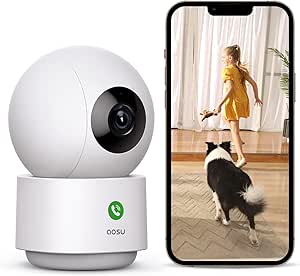 | Best for Local 24/7 Recording | Resolution: 2K QHD; 3 MP still resolution | Wi-Fi: 2.4 GHz only | Pan and tilt: 360° horizontal rotation; 155° vertical tilt | VIEW ON AMAZON | See Our Full Breakdown |
| CIAJIE Indoor Two-Way Video Call Security Camera with 4.3-Inch Screen |  | Best for Screen-Based Family Check-Ins | Screen: 4.3 inches | Video resolution: 1080p | Connectivity: Wi-Fi, 2.4 GHz and 5 GHz | VIEW ON AMAZON | See Our Full Breakdown |
| Tapo C216 2K Indoor/Outdoor Pan/Tilt Security Camera, 2-Pack | 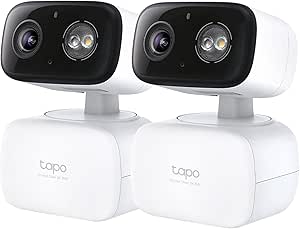 | Best for Two-Site Coverage | Pack size: Two cameras | Resolution: 2K, 3 MP | Connectivity: 2.4 GHz Wi-Fi | VIEW ON AMAZON | See Our Full Breakdown |
| PaxsreeKam 1080p Wi-Fi Indoor Camera for Pets and Children |  | Best Compact Camera for Temporary Placement | Resolution: 1080p | Frame rate: 15 frames per second | Viewing angle: 140° | VIEW ON AMAZON | See Our Full Breakdown |
| Eufy Security 4K Indoor Cam S350, No Subscription, Dual Cameras, 8× Zoom |  | Best for Detailed Room Coverage | Resolution: 4K UHD | Zoom: 8× hybrid zoom | Coverage: 360° with auto-tracking | VIEW ON AMAZON | See Our Full Breakdown |
| blurams 2K Indoor Security Camera, 2-Pack |  | Best for Monitoring Two Rooms | Pack size: 2 cameras | Resolution: 2K | Coverage: 360° pan-and-tilt | VIEW ON AMAZON | See Our Full Breakdown |
| eufy Security 4K Indoor Camera E30, No Subscription, Pet Camera |  | Best for Smart-Home Households | Resolution: 4K Ultra-High Definition | Panoramic view: 360° | Night vision: Color night vision with built-in spotlight | VIEW ON AMAZON | See Our Full Breakdown |
| SensForge 2.5K Indoor Pan-Tilt Security Camera, 360° Dual-Band Wi-Fi, AI Human & Pet Detection, 64GB SD Card Included, Two-Way Talk, No Subscription Required |  | Best Value for Local Recording | Resolution: 2.5K HD | Pan and tilt: 360° horizontal, 90° vertical | Wi-Fi: Dual-band 2.4 GHz and 5 GHz | VIEW ON AMAZON | See Our Full Breakdown |
| 1080P Full HD Indoor WiFi Camera, Home Security Pet Monitor, Night Vision & Motion Detection |  | Best for Basic, Fixed-View Monitoring | Video resolution: 1080P Full HD | Night vision: Yes | Storage: microSD support up to 256GB; card not included | VIEW ON AMAZON | See Our Full Breakdown |
| GNCC 2K Indoor Security Camera with AI Motion Tracking |  | Best for Flexible Tracking and Storage | Resolution: 2K | Night vision range: 10 meters | Pan and tilt: 340° horizontal, 80° vertical | VIEW ON AMAZON | See Our Full Breakdown |
| Funstorm 4K Wi-Fi Indoor Security Camera with Night Vision | 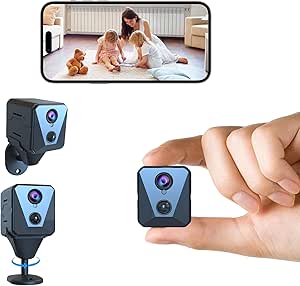 | Best Compact Battery-Powered Option | Resolution: Title lists 4K UHD; video capture is listed as 1080p | Field of view: Listed as 110°; camera optics are listed as 150° | Battery: 2,600 mAh rechargeable | VIEW ON AMAZON | See Our Full Breakdown |
| Anona 4K UHD Indoor Security Camera, 2-Pack |  | Best for Monitoring Multiple Rooms | Resolution: 4K UHD, 8 MP | Quantity: 2 cameras | Pan and tilt: 360° pan, 110° tilt | VIEW ON AMAZON | See Our Full Breakdown |
| nanny cam for elderly parent | Resolution | Audio | Night vision | Storage |
|---|---|---|---|---|
| Arlo Essential Indoor Pan Tilt | 2K | Noise-canceling two-way audio; integrated siren | — | — |
| aosu 2K Indoor Security Camera | 2K QHD; 3 MP still resolution | Two-way audio with one-touch calls | — | — |
| CIAJIE Indoor Two-Way Video Ca | — | Two-way audio | Yes | — |
| Tapo C216 2K Indoor/Outdoor Pa | 2K, 3 MP | Two-way audio | IR, spotlight color, and smart mode | — |
| PaxsreeKam 1080p Wi-Fi Indoor | 1080p | — | Infrared | — |
| Eufy Security 4K Indoor Cam S3 | 4K UHD | — | Yes, up to 32 ft | Local SD card; card not included |
| blurams 2K Indoor Security Cam | 2K | Two-way audio | Color and infrared | microSD up to 256 GB, not included; optional cloud storage |
| eufy Security 4K Indoor Camera | 4K Ultra-High Definition | Two-way communication | Color night vision with built-in spotlight | Local storage via SD card, sold separately |
| SensForge 2.5K Indoor Pan-Tilt | 2.5K HD | — | — | 64GB SD card included |
| 1080P Full HD Indoor WiFi Came | — | Two-way audio not specified | Yes | microSD support up to 256GB; card not included |
| GNCC 2K Indoor Security Camera | 2K | Two-way audio | — | Cloud or 16–128 GB SD card; card not included |
| Funstorm 4K Wi-Fi Indoor Secur | Title lists 4K UHD; video capture is listed as 1080p | — | — | — |
| Anona 4K UHD Indoor Security C | 4K UHD, 8 MP | — | — | microSD up to 512 GB, not included, or cloud |
More Details on Our Top Picks
Arlo Essential Indoor Pan Tilt Zoom Security Camera 2K (1-Cam + 6 Mo Plan)
For families who want a camera to follow movement around a room, the Arlo Essential Indoor Pan Tilt Zoom is the strongest fit in this group. Its 360° pan, 180° tilt, and automatic motion tracking can keep a moving parent in view without requiring someone to reposition the camera. 2K video, night vision, and two-way audio support both checking in and seeing what is happening in dim conditions. Compared with the fixed 140° view of the PaxsreeKam 1080p Wi-Fi Indoor Camera, Arlo covers more of a room and offers more detailed footage. The tradeoff is ongoing cost: premium features require a subscription after the included six months. It also needs an outlet and is indoor-only, so it is less flexible than the outdoor-rated Tapo C216.
Pros:- 2K video with 360° pan and 180° tilt covers a broad room.
- Automatic motion tracking can keep a moving person in view.
- People, pet, and selected sound detection can help distinguish alerts.
- Noise-canceling two-way audio and night vision support remote check-ins.
Cons:- Premium features require a paid subscription after the included six-month plan.
- Corded power limits placement to locations near an outlet.
- Indoor-only design is less versatile than the outdoor-rated Tapo C216.
Best for: Families who want a powered camera to track movement across a large indoor room and value person and sound detection.
Not ideal for: Households avoiding recurring subscription costs or needing a camera for a porch, yard, or other exposed location.
- Resolution:2K
- Pan and tilt:360° pan; 180° tilt
- Connectivity:Dual-band Wi-Fi, 2.4 GHz and 5 GHz
- Power:Corded electric
- Audio:Noise-canceling two-way audio; integrated siren
- Smart detection:People, pets, and selected sounds
- Smart home compatibility:Amazon Alexa, Google Assistant, IFTTT, and SmartThings
- Included plan:Six months of Arlo Secure Plus
Our verdict“Choose Arlo if room-wide tracking and richer detection matter more than avoiding a continuing subscription.”
aosu 2K Indoor Security Camera and Baby Monitor
The aosu 2K Indoor Security Camera makes sense for families who want continuous recording options alongside remote check-ins. Its listed 24/7 local recording and support for storage up to 128 GB give it an advantage over the CIAJIE Indoor Two-Way Video Call Camera, whose supplied details focus on calls and shared access rather than continuous local recording. Two-way audio with one-touch calls can make routine contact more direct, while motion tracking, 360° horizontal rotation, and infrared night vision help cover a room day and night. The limits are its 2.4 GHz-only Wi-Fi and 155° vertical tilt, which offer less network flexibility and vertical range than Arlo’s dual-band model. It is also wired and intended only for indoor use.
Pros:- 2K video provides more detail than a 1080p camera such as the CIAJIE.
- One-touch two-way calls can make check-ins more immediate.
- 360° horizontal rotation and motion tracking help follow activity around a room.
- Supports 24/7 recording and local storage up to 128 GB.
Cons:- Connects to 2.4 GHz Wi-Fi only.
- 155° vertical tilt is less extensive than the Arlo’s 180° tilt.
- Corded power and indoor-only construction restrict placement.
Best for: Families seeking a corded indoor camera with 2K viewing, one-touch two-way calls, and local 24/7 recording support.
Not ideal for: Households with only 5 GHz Wi-Fi, or caregivers who need a camera that can be moved outdoors or run on battery.
- Resolution:2K QHD; 3 MP still resolution
- Wi-Fi:2.4 GHz only
- Pan and tilt:360° horizontal rotation; 155° vertical tilt
- Audio:Two-way audio with one-touch calls
- Night vision range:Up to 33 feet
- Storage capacity:Up to 128 GB
- Recording:24/7 recording; local recording supported
- Compatibility:Amazon Alexa and Google Assistant
Our verdict“Pick aosu if local continuous recording and straightforward two-way calls are priorities and your home uses 2.4 GHz Wi-Fi.”
CIAJIE Indoor Two-Way Video Call Security Camera with 4.3-Inch Screen
The CIAJIE Indoor Two-Way Video Call Camera is the most call-centered option here: its built-in 4.3-inch screen gives the person at home a direct way to see and speak with family, rather than relying only on a phone app. That makes it distinct from the aosu 2K Indoor Security Camera, which offers sharper video and local 24/7 recording but no listed camera-side screen. CIAJIE adds 1080p video, night vision, motion detection, and shared access for up to 10 family members, a useful setup when several relatives take turns checking in. The compromise is lower resolution than the 2K Arlo and aosu models, and the supplied information does not specify local recording. It also depends on Wi-Fi and a wall outlet.
Pros:- Built-in 4.3-inch screen supports video calls from the camera side.
- Access can be shared with up to 10 family members.
- 360° wide-angle view, motion detection, and night vision support room monitoring.
- Supports both 2.4 GHz and 5 GHz Wi-Fi.
Cons:- 1080p resolution is lower than the 2K Arlo and aosu cameras.
- Wi-Fi is required for its connected calling and monitoring functions.
- The supplied product details do not specify local recording support.
Best for: Families who want an on-device screen for video calls and need to share camera access among several relatives.
Not ideal for: Buyers who prioritize 2K detail, specified local recording, or a portable camera that works without Wi-Fi and outlet power.
- Screen:4.3 inches
- Video resolution:1080p
- Connectivity:Wi-Fi, 2.4 GHz and 5 GHz
- Audio:Two-way audio
- View:360° wide-angle
- Night vision:Yes
- Power and mount:Corded electric; tabletop
- Shared access:Up to 10 family members
- Dimensions:5 × 5 × 7.5 inches
Our verdict“Choose CIAJIE when a screen-based video call and shared family access matter more than higher resolution or documented continuous recording.”
Tapo C216 2K Indoor/Outdoor Pan/Tilt Security Camera, 2-Pack
When a family needs to monitor both an indoor living area and an outdoor entrance, the Tapo C216 two-camera pack has a broader role than the indoor-only options here. Its IP65-rated design allows outdoor placement, while two-way audio and pan/tilt control support check-ins and room coverage. Compared with the Arlo Essential Indoor Pan Tilt Zoom, Tapo gives you two cameras and supports local microSD recording up to 512 GB, but Arlo offers dual-band Wi-Fi and more vertical tilt. Tapo’s microSD card is sold separately, and its 2.4 GHz-only Wi-Fi and wired power require planning around network coverage and outlets. Its detection zones and privacy zones also help tailor what triggers alerts, but this is a less convenient choice if you want battery-powered placement.
Pros:- Two cameras can cover separate rooms or an indoor and outdoor location.
- IP65-rated construction supports indoor and outdoor placement.
- Local microSD recording up to 512 GB avoids relying solely on cloud storage.
- AI detection, motion tracking, privacy zones, and multiple night vision modes offer flexible monitoring.
Cons:- MicroSD cards are sold separately.
- Requires 2.4 GHz Wi-Fi and wired power for each camera.
- Its 105° tilt range is narrower than the Arlo’s 180° vertical tilt.
Best for: Families covering two locations, such as a parent’s main room and an outdoor entry, who want local storage and wired cameras.
Not ideal for: Caregivers who need battery operation, 5 GHz Wi-Fi, or a ready-to-record setup without buying a microSD card.
- Pack size:Two cameras
- Resolution:2K, 3 MP
- Connectivity:2.4 GHz Wi-Fi
- Pan and tilt:340° pan; 105° tilt
- Night vision:IR, spotlight color, and smart mode
- Local storage:microSD up to 512 GB; card sold separately
- Audio:Two-way audio
- Power:5.0 V/1 A DC adapter with 6.5-foot cord
Our verdict“Choose the Tapo two-pack if you need two-site coverage and local recording, and can accommodate wired power and 2.4 GHz Wi-Fi.”
PaxsreeKam 1080p Wi-Fi Indoor Camera for Pets and Children
The PaxsreeKam 1080p Indoor Camera is the smallest, most placement-flexible pick in this set, thanks to its magnetic stand and rechargeable battery. That can help when a caregiver needs to move a camera between surfaces or briefly check a space without routing a power cord. Its cordless runtime is up to four hours, though, so it is not a practical substitute for continuous monitoring without power. Compared with the Arlo Essential Indoor Pan Tilt Zoom, PaxsreeKam has a fixed 140° viewing angle, 1080p video, and motion-only alerts rather than room-tracking and richer detection. The aosu 2K Indoor Security Camera is a better fit for regular powered monitoring with pan-and-tilt coverage; PaxsreeKam’s advantage is compact, temporary placement, not broad coverage or advanced alerts.
Pros:- Compact 2.1 × 1.2 × 0.8-inch body is easy to place discreetly.
- Magnetic stand and wall-mount option allow flexible positioning.
- Rechargeable battery supports up to four hours of cordless use.
- 1080p video and infrared night vision support basic day and night checks.
Cons:- Battery runtime is limited to up to four hours; continuous monitoring needs power.
- Fixed 140° viewing angle does not match the room coverage of pan-and-tilt models.
- Supports 2.4 GHz Wi-Fi only and motion alerts only.
Best for: Caregivers who want a compact camera that can be repositioned easily and used unplugged for short checks.
Not ideal for: Families needing continuous overnight monitoring, pan-and-tilt coverage, or alerts beyond motion detection.
- Resolution:1080p
- Frame rate:15 frames per second
- Viewing angle:140°
- Wi-Fi:2.4 GHz; 5 GHz not supported
- Battery:1000 mAh; up to four hours cordless use
- Night vision:Infrared
- Alerts:Motion only
- Mount:Magnetic stand; wall mount
- Use:Indoor; not water resistant
Our verdict“Pick PaxsreeKam for compact, short-term cordless checks, but choose a powered pan-and-tilt model for ongoing room monitoring.”
Eufy Security 4K Indoor Cam S350, No Subscription, Dual Cameras, 8× Zoom
For families who need to check more than whether a room is occupied, the Eufy Security 4K Indoor Cam S350 stands out for its 4K picture, 8× hybrid zoom, and 360° coverage with auto-tracking. Zoom can help reveal details from across a room, while the rotating view follows movement instead of leaving blind spots outside a fixed frame. Compared with the SensForge 2.5K Indoor Pan-Tilt Security Camera, this Eufy offers sharper listed resolution and greater zoom, but SensForge includes a 64GB card and does not list a HomeBase requirement. The S350’s local SD-card storage avoids a required subscription, though the card is sold separately and the product data says it requires HomeBase 3. It is a stronger fit for detail-focused monitoring than for households seeking the simplest standalone setup.
Pros:- 4K UHD video and 8× hybrid zoom provide more detail at a distance.
- 360° coverage and auto-tracking can follow movement across a room.
- Local SD-card storage is available without a required subscription.
- Night vision is specified for viewing up to 32 feet.
Cons:- Requires HomeBase 3 for operation, adding another setup dependency.
- SD card is not included.
- Does not support Apple HomeKit.
Best for: Families who want to inspect a larger room remotely, follow movement, and keep recordings on local storage.
Not ideal for: Apple HomeKit households or anyone who wants a straightforward standalone camera without a separate HomeBase 3 or SD card purchase.
- Resolution:4K UHD
- Zoom:8× hybrid zoom
- Coverage:360° with auto-tracking
- Night vision:Yes, up to 32 ft
- Storage:Local SD card; card not included
- Compatibility:Works with HomeBase 3; does not support HomeKit
Our verdict“Choose the S350 if zoomed-in detail and tracking matter more than a simple setup or Apple HomeKit support.”
blurams 2K Indoor Security Camera, 2-Pack
The blurams 2K 2-pack is the clearest choice here for families who need coverage in two separate rooms without buying cameras one at a time. Each unit offers 360° pan-and-tilt, person and sound detection, automatic tracking, night vision, and two-way audio, so a caregiver can check activity and speak through the camera. Compared with the 1080P Full HD Indoor WiFi Camera, blurams adds room-wide movement coverage, two-way talk, and a second camera; the simpler 1080P model may suit buyers who only need a fixed live view and motion alerts. Local microSD storage avoids a required cloud plan, but cards are not included, and cloud storage is subscription-based. These cameras are indoor-only, so they are not suited to monitoring an outdoor entrance or exposed area.
Pros:- Two cameras make it practical to monitor separate rooms.
- 360° pan-and-tilt with automatic human and pet tracking follows activity.
- Two-way audio supports remote check-ins through the camera.
- Supports microSD storage and Alexa and Google Assistant.
Cons:- MicroSD cards are not included, and cloud storage requires a subscription.
- Indoor-only construction rules out outdoor use.
- The two-camera setup may be more than needed for monitoring one room.
Best for: Families placing cameras in two indoor locations, such as a living room and hallway, who want two-way talk and tracking.
Not ideal for: Buyers who need weatherproof outdoor coverage, included memory cards, or a single fixed camera with minimal features.
- Pack size:2 cameras
- Resolution:2K
- Coverage:360° pan-and-tilt
- Wi-Fi:Dual-band Wi-Fi 6, 2.4 GHz and 5 GHz
- Detection and tracking:Motion, person, and sound detection; automatic pet and human tracking
- Audio:Two-way audio
- Night vision:Color and infrared
- Storage:microSD up to 256 GB, not included; optional cloud storage
- Compatibility:Alexa and Google Assistant
Our verdict“Pick blurams when two-room coverage and camera-based conversation matter more than outdoor use or included storage.”
eufy Security 4K Indoor Camera E30, No Subscription, Pet Camera
The eufy Security 4K Indoor Camera E30 pairs high-resolution video and 360° viewing with a useful compatibility advantage: it works with HomeKit, Alexa, and Google Assistant. That makes it a better match than the S350 for households already organized around Apple HomeKit, though HomeKit video is limited to 1080p rather than the camera’s listed 4K resolution. Color night vision with a built-in spotlight can make nighttime footage easier to interpret than a basic infrared-only view, and two-way communication supports remote check-ins. Local storage does not require a subscription, but an SD card is sold separately. Compared with the blurams 2-pack, the E30 offers 4K resolution and broad smart-home support, while blurams includes two cameras for covering separate rooms. Buyers should weigh one-camera clarity against multi-room reach.
Pros:- 4K video and a 360° view support detailed room monitoring.
- Works with HomeKit, Alexa, and Google Assistant.
- Color night vision with a built-in spotlight can make dark-room footage easier to read.
- Local storage is available without a required subscription.
Cons:- SD card for local storage is sold separately.
- HomeKit support is limited to 1080p resolution.
- Optional cloud storage may add ongoing costs.
Best for: Families using Apple HomeKit, Alexa, or Google Assistant who want a high-resolution camera for one room and local recording.
Not ideal for: Households that need included storage, two cameras in the package, or 4K footage through HomeKit.
- Resolution:4K Ultra-High Definition
- Panoramic view:360°
- Night vision:Color night vision with built-in spotlight
- Audio:Two-way communication
- Storage:Local storage via SD card, sold separately
- Compatibility:HomeKit, Alexa, and Google Assistant
- Detection:AI-powered human and pet detection
Our verdict“Choose the E30 for smart-home flexibility and 4K viewing, provided you accept a separate SD card and HomeKit’s lower resolution.”
SensForge 2.5K Indoor Pan-Tilt Security Camera, 360° Dual-Band Wi-Fi, AI Human & Pet Detection, 64GB SD Card Included, Two-Way Talk, No Subscription Required
Among these picks, the SensForge 2.5K has a practical advantage for families who want local recordings ready from setup: its 64GB SD card is included. Its 360° horizontal pan and 90° vertical tilt cover more of a room than the fixed-view 1080P Full HD camera, while AI human and pet detection, two-way talk, and 30-foot night vision support routine remote check-ins. Compared with the Eufy Security 4K Indoor Cam S350, SensForge gives up 4K resolution and the S350’s listed 8× zoom, but it avoids a separate SD-card purchase and does not list a HomeBase requirement. The tradeoff is a corded 10.3W setup and an app listed only for the US and Canada. For families outside those regions, this is not the flexible choice.
Pros:- Includes a 64GB SD card for local recording.
- 360° horizontal pan and 90° vertical tilt help cover a full room.
- AI human and pet detection can help focus alerts on relevant activity.
- Two-way talk and night vision support remote check-ins.
Cons:- Requires a constant power connection.
- App availability is limited to the US and Canada.
- Indoor-only design does not suit outdoor monitoring.
Best for: US or Canadian households seeking pan-and-tilt coverage, two-way talk, and included local storage without a subscription.
Not ideal for: People outside the US and Canada, or anyone needing a battery-powered, outdoor, or 4K camera.
- Resolution:2.5K HD
- Pan and tilt:360° horizontal, 90° vertical
- Wi-Fi:Dual-band 2.4 GHz and 5 GHz
- Storage:64GB SD card included
- Night vision range:30 ft
- Power:Corded electric, 10.3W
- Compatibility:Indoor use; iOS and Android app
Our verdict“Choose SensForge for an included memory card and practical pan-and-tilt monitoring if its app is available in your region.”
1080P Full HD Indoor WiFi Camera, Home Security Pet Monitor, Night Vision & Motion Detection
If the goal is a simple live view with motion alerts, this 1080P Full HD indoor camera keeps the feature set more basic than the pan-and-tilt models in this lineup. It offers night vision, motion detection, instant app alerts, and microSD support, which may be enough for checking a room without needing automatic tracking or smart-home integrations. Compared with the blurams 2K Indoor Security Camera, this camera does not list 360° pan-and-tilt, two-way audio, person detection, or a second camera in the package. That simpler feature set means fewer specified ways to interact with or follow a person remotely. The product details also do not specify a viewing angle, card inclusion, or audio function, so buyers should not assume those capabilities. It is a fit for basic viewing, not an interactive care tool.
Pros:- 1080P Full HD video supports routine remote room checks.
- Night vision supports viewing in low-light conditions.
- Motion detection can send instant app alerts.
- Supports microSD cards up to 256GB for local storage.
Cons:- MicroSD card is not included.
- Two-way audio is not specified, limiting its usefulness for speaking to a parent.
- Wi-Fi-only connectivity offers no listed alternative connection method.
Best for: Caregivers who want a straightforward Wi-Fi live view with night vision and motion alerts for one indoor room.
Not ideal for: Families who need two-way conversation, pan-and-tilt coverage, person-specific alerts, or confirmed audio features.
- Video resolution:1080P Full HD
- Night vision:Yes
- Storage:microSD support up to 256GB; card not included
- Connectivity:Wi-Fi
- Detection:Motion detection
- Alerts:Instant app alerts
- Audio:Two-way audio not specified
Our verdict“Choose this camera for basic live viewing and motion alerts, but select a model like blurams if you need two-way talk or room-wide tracking.”
GNCC 2K Indoor Security Camera with AI Motion Tracking
The GNCC 2K is a practical choice for families who want a moving view of a parent’s room and a choice between cloud and local recording. Its AI motion tracking, 340-degree pan, and 80-degree tilt can follow activity across a wider area than a fixed-view camera, while two-way audio lets a caregiver speak through the app. Compared with the Funstorm, GNCC offers pan-and-tilt coverage and clearer stated recording details, but it needs a continuous power arrangement rather than relying on an advertised long-life battery. Its 2K video and 10-meter night vision suit routine room checks; at 10 fps, however, motion may look less fluid than on faster cameras. Local playback also requires buying a compatible SD card, while cloud playback requires a subscription.
Pros:- 2K video and 10-meter night vision support room checks in low light
- AI motion tracking with customizable detection zones can follow activity
- Two-way audio and Alexa compatibility support remote check-ins
- Offers cloud or local SD-card storage
Cons:- SD card is not included, and cloud playback requires a subscription
- Video playback requires cloud access or a separately purchased SD card
- 10 fps may make movement appear less smooth
Best for: Families who want a pan-and-tilt camera with two-way talk and the option to store footage locally or in the cloud
Not ideal for: Caregivers who want recording ready out of the box or who do not want to pay for a cloud plan or buy an SD card
- Resolution:2K
- Night vision range:10 meters
- Pan and tilt:340° horizontal, 80° vertical
- Frame rate:10 fps
- Connectivity:2.4 GHz and 5 GHz Wi-Fi; Bluetooth setup
- Audio:Two-way audio
- Storage:Cloud or 16–128 GB SD card; card not included
- Compatibility:Alexa, Android, Google Assistant
Our verdict“Choose the GNCC if you want tracking, two-way talk, and flexible storage, and are comfortable arranging recording access separately.”
Funstorm 4K Wi-Fi Indoor Security Camera with Night Vision
The Funstorm stands out for caregivers who want a small camera without planning around a nearby outlet: its 2,600 mAh rechargeable battery is advertised to last up to 100 days. That makes placement more flexible than the corded Anona 4K 2-Pack, though Funstorm does not offer Anona’s pan-and-tilt coverage, two-way audio, or specified local storage. It provides app-based viewing, motion detection, and night vision, but its listing gives conflicting resolution and viewing-angle figures: 4K is named in the product title while video capture is listed as 1080p, and the field of view is given as both 110 and 150 degrees. I would treat those specifications cautiously when choosing a camera for detailed checks. The power adapter is also not included, and this indoor-only model is not water resistant.
Pros:- Compact body and rechargeable battery allow more flexible placement
- Advertised battery life is up to 100 days
- App-based remote viewing and motion detection support off-site checks
- Includes night vision and mounting accessories
Cons:- Conflicting listed resolution and field-of-view specifications make image coverage hard to judge
- Power adapter is not included
- Indoor-only design is not water resistant and does not list two-way audio or local storage
Best for: Caregivers who need a small, rechargeable camera that can be placed away from a convenient power outlet
Not ideal for: Families who need dependable high-resolution detail, two-way conversation, pan-and-tilt coverage, or clearly specified recording capabilities
- Resolution:Title lists 4K UHD; video capture is listed as 1080p
- Field of view:Listed as 110°; camera optics are listed as 150°
- Battery:2,600 mAh rechargeable
- Advertised battery life:Up to 100 days
- Features:Night vision, motion detection, app-based remote viewing
- Use:Indoor; not water resistant
- Mounting:Wall mount; screw-in installation
- Included items:Camera, USB charging cable, mounting accessories; power adapter not included
Our verdict“Pick the Funstorm for compact, rechargeable placement, but choose the Anona if you need clearer coverage details and two-way communication.”
Anona 4K UHD Indoor Security Camera, 2-Pack
For families splitting checks between a bedroom and a shared living space, the Anona 4K 2-Pack offers two cameras with broad remote-controlled coverage. Each unit combines 360-degree pan, 110-degree tilt, 8× digital zoom, and motion tracking, giving caregivers more flexibility than the GNCC 2K single-camera setup. Person detection and two-way audio are more directly useful for checking on an older adult than the baby-cry detection also listed; the latter is not a feature most elder-care households need. Video is recorded at 15 fps, so the 4K resolution and zoom do not mean especially smooth motion, and the microSD card must be purchased separately for local recording. The cameras are corded, which avoids battery recharging but limits placement to spots with power. Cloud storage is another option.
Pros:- Two cameras cover separate rooms in one system
- 360° pan, 110° tilt, and motion tracking expand room coverage
- Person detection and two-way audio support remote check-ins
- Offers local microSD or encrypted cloud storage
Cons:- microSD card is not included for local recording
- 15 fps footage may look less fluid during movement
- Corded 5 V power limits placement compared with the rechargeable Funstorm
Best for: Families who want to monitor two rooms and value broad pan-and-tilt coverage, person detection, and two-way talk
Not ideal for: Caregivers seeking a battery-powered setup, included local storage, or smoother motion footage
- Resolution:4K UHD, 8 MP
- Quantity:2 cameras
- Pan and tilt:360° pan, 110° tilt
- Zoom:8× digital
- Detection:Person, pet, and baby-cry detection
- Frame rate:15 fps
- Wi-Fi:Dual-band 2.4 GHz and 5 GHz; Wi-Fi 6
- Storage:microSD up to 512 GB, not included, or cloud
- Power:Corded electric, 5 V
Our verdict“Choose the Anona if you need two-room coverage and two-way communication, and can accommodate corded cameras and separately sourced storage.”
How We Picked
I evaluated these devices based on three primary criteria relevant to elder care: privacy and data security, ease of interaction, and reliability of connectivity. Unlike standard home security cameras, nanny cams for seniors must prioritize local data storage to protect sensitive household routines from cloud breaches. I also assessed the clarity of two-way audio and the simplicity of the mobile interface, as caregivers often check in multiple times a day. Models requiring complex Wi-Fi configurations or frequent battery changes were ranked lower due to the burden they place on busy families.
Additionally, I considered the physical design and mounting options. Discreet cameras are often preferred to maintain a sense of normalcy in the home, while larger units with screens serve a dual purpose as communication devices. I excluded products with poor night vision or unreliable motion alerts, as these features are essential for monitoring sleep patterns and nighttime safety without disturbing the resident.
| nanny cam for elderly parent | Audio | Night vision |
|---|---|---|
| Arlo Essential Indoor Pan Tilt | Noise-canceling two-way audio; integrated siren | — |
| aosu 2K Indoor Security Camera | Two-way audio with one-touch calls | — |
| CIAJIE Indoor Two-Way Video Ca | Two-way audio | Yes |
| Tapo C216 2K Indoor/Outdoor Pa | Two-way audio | IR, spotlight color, and smart mode |
| PaxsreeKam 1080p Wi-Fi Indoor | — | Infrared |
| Eufy Security 4K Indoor Cam S3 | — | Yes, up to 32 ft |
| blurams 2K Indoor Security Cam | Two-way audio | Color and infrared |
| eufy Security 4K Indoor Camera | Two-way communication | Color night vision with built-in spotlight |
| SensForge 2.5K Indoor Pan-Tilt | — | — |
| 1080P Full HD Indoor WiFi Came | Two-way audio not specified | Yes |
| GNCC 2K Indoor Security Camera | Two-way audio | — |
| Funstorm 4K Wi-Fi Indoor Secur | — | — |
| Anona 4K UHD Indoor Security C | — | — |
Factors to Consider When Choosing Nanny Cam For Elderly Parents
Selecting a monitoring solution for aging loved ones involves more than just picking the highest resolution. You must weigh the emotional impact of surveillance against the practical need for safety. This guide breaks down the factors that matter most when choosing a camera for an elderly parent’s home.Privacy Versus Convenience
Many families default to cloud-based cameras for easy access, but this introduces a risk of data breaches involving sensitive footage of a vulnerable person. Local storage options keep footage on an SD card or a home hub, meaning no one else can access the video without physical presence. While cloud plans offer convenience, they create a recurring expense and a potential privacy loophole. For elderly care, where routines are intimate and consistent, I advise choosing devices with end-to-end encryption and local recording capabilities. This approach respects the dignity of the parent while still providing the safety net you need.
The Importance of Two-Way Audio Quality
A camera is only useful if you can communicate effectively. Many budget models suffer from echo or low-volume speakers, making it difficult to hear if a parent has fallen or needs help. High-fidelity microphones and speakers are non-negotiable for checking on individuals who may have hearing impairments. Test the latency; a delay of even a few seconds can make conversation feel unnatural and frustrating. Prioritize models specifically marketed for baby monitoring or intercoms, as these often feature superior audio processing compared to generic security cams.
Ease of Use for Non-Tech-Savvy Seniors
If your parent needs to interact with the device, the interface must be intuitive. Cameras with built-in screens allow seniors to see who is calling without navigating a smartphone app. This reduces the cognitive load and ensures they can respond to family members easily. Avoid devices that require complex pairing processes or frequent firmware updates that might disrupt their routine. The goal is to integrate the technology seamlessly into their life, not to make them manage a gadget. Simplicity often trumps advanced features like 4K resolution if the primary goal is communication.
Motion Detection and AI Accuracy
False alarms are the quickest way to cause caregiver burnout. Basic motion sensors trigger alerts for pets, shadows, or ceiling fans, leading to alert fatigue. Look for AI-driven human detection that can distinguish between a person and other moving objects. This feature allows you to set specific zones, such as the kitchen or bedroom, to receive notifications only when activity is relevant. Some advanced models can even detect falls, though this technology is still maturing and should not replace professional medical alert systems. Accurate detection ensures you respond quickly to actual emergencies rather than trivial movements.
Placement and Discretion
Where you place the camera affects both its effectiveness and your parent’s comfort. Discreet designs blend into the home decor, reducing the feeling of being watched. However, visibility can sometimes be beneficial if the senior wants to know when family is checking in. Consider the angle: high mounts provide a better overview but may miss facial expressions, while eye-level placements foster better connection. Avoid placing cameras in bathrooms or bedrooms unless there is a specific medical necessity and explicit consent. Balancing security with respect is key to maintaining a healthy relationship with the monitored individual.
Frequently Asked Questions
Is it legal to install a nanny cam in my elderly parent’s home?
Legality depends heavily on local laws and the type of care arrangement. If your parent lives in an assisted living facility, you must check the facility’s policy, as many prohibit private cameras in shared spaces. In a private residence, consent is generally required if the person has full mental capacity. If they have dementia or lack capacity, the legal guardian usually has the authority to install monitoring devices for safety purposes. Always consult with a local attorney or elder law specialist before installation to avoid legal repercussions. Transparency with caregivers and the parent, when possible, is also an ethical best practice.
Do I need a subscription for a nanny cam used for elderly care?
Not necessarily, and many families prefer to avoid them. Devices like the Eufy S350 offer local storage, meaning you pay once for the hardware and store footage on an SD card or home base. Cloud subscriptions, common with Arlo or Ring, offer easy remote access and longer history but involve monthly fees and potential privacy risks. For elder care, where you might need to review footage from weeks ago to spot behavioral changes, local storage is often more cost-effective and secure. Evaluate whether the convenience of cloud access outweighs the ongoing cost and privacy tradeoffs for your specific situation.
How do I handle the privacy concerns of my elderly parent?
Open communication is the most effective strategy. Explain the reasons for the camera, focusing on safety and family connection rather than surveillance. Show them how they can view the feed or talk to you, giving them a sense of control. Some seniors appreciate the ability to see grandchildren or check in with family members remotely. If they resist, consider a camera with a physical cover or a privacy mode that can be activated from their end. Respecting their autonomy while ensuring safety requires a delicate balance, often achieved by involving them in the selection and placement of the device.
Can a nanny cam detect falls effectively?
Standard video cameras cannot reliably detect falls; they only record them after the fact. Some advanced AI models claim fall detection, but they are prone to false positives and may miss subtle slips. For reliable fall detection, dedicated wearable devices or radar-based sensors are superior to optical cameras. A nanny cam serves as a verification tool: if an alert system triggers, you can use the camera to see what happened. Do not rely solely on video for fall prevention. Use the camera to check on your parent after an alert or to review daily activity patterns for signs of declining mobility.
What is the best camera type for a senior with dementia?
For seniors with dementia, simplicity and familiarity are paramount. A camera with a built-in screen, like the CIAJIE model, allows them to see who is calling without navigating a confusing app. Fixed cameras are better than pan-tilt models, which can be disorienting if the camera moves unexpectedly. Avoid devices with flashing lights or loud chimes that might cause agitation. The goal is passive monitoring that feels like a natural part of the home environment. Choose a design that looks like a household object, such as a picture frame or a clock, to reduce anxiety and resistance.
Conclusion
Choosing the right nanny cam for elderly parents depends on your family’s specific needs and your parent’s comfort level. For most families, the Eufy Security 4K Indoor Cam S350 is the best overall choice due to its privacy-focused local storage and high-quality video. If your priority is direct communication with a parent who struggles with technology, the CIAJIE Indoor Two-Way Video Call Security Camera offers a user-friendly screen interface. For budget-conscious buyers who need basic monitoring without recurring fees, the Tapo C216 2-Pack provides excellent value. Ultimately, the best camera is one that respects your parent’s dignity while giving you the peace of mind you need.